Epic Cash

26.10.21 October 2026 Windows, Linux and Android macOS and iOS preview

Download Changelog

Downloads

Without Tor: the same app with Tor left out completely, for places where Tor is unwanted or blocked. It cannot send to Tor addresses and does not update itself: get new versions from this page. Installing it over the normal app keeps your wallets.

SHA-256 under each card. SHA256SUMS sits next to the files. What changed in each version: changelog.

macOS and iPhone Preview

Early builds for Apple devices: unsigned, not notarised by Apple and not in the App Store. They run the same wallet as the other versions; expect rough edges.

The app, page by page

01Home

  • Available to spend, big. Under it: Confirming, Waiting for sender, Locked in sends, Total.
  • Node and Epicbox status icons under the balance. Hold one for its state, tap it for the server.
  • Recent activity with the state in words: Received, Sent, Confirming 2 of 3, Waiting for recipient.
  • The eye hides the balances. Prices in your currency, or none.
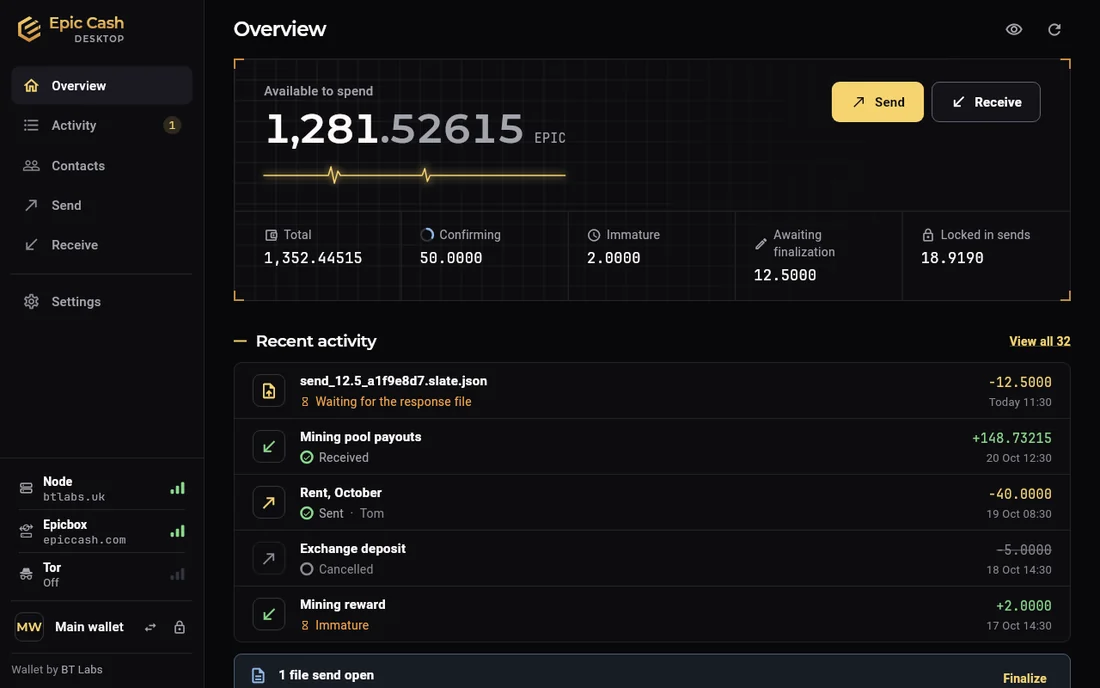
Epic Cash Desktop, Overview: Available to spend 1,281.52615 EPIC, tiles for Total, Confirming, Immature, Awaiting finalization and Locked in sends, Send and Receive buttons, recent activity with states in words; the sidebar shows Node, Epicbox, HTTP and Tor rows.
Desktop · Overview
Epic Cash Mobile, Wallet tab: the balance, tiles for Confirming, Waiting for sender, Locked in sends and Total, node and Epicbox status icons under it, a row of Activity and Contacts, a card about a payment waiting for the recipient.
Phone · Wallet

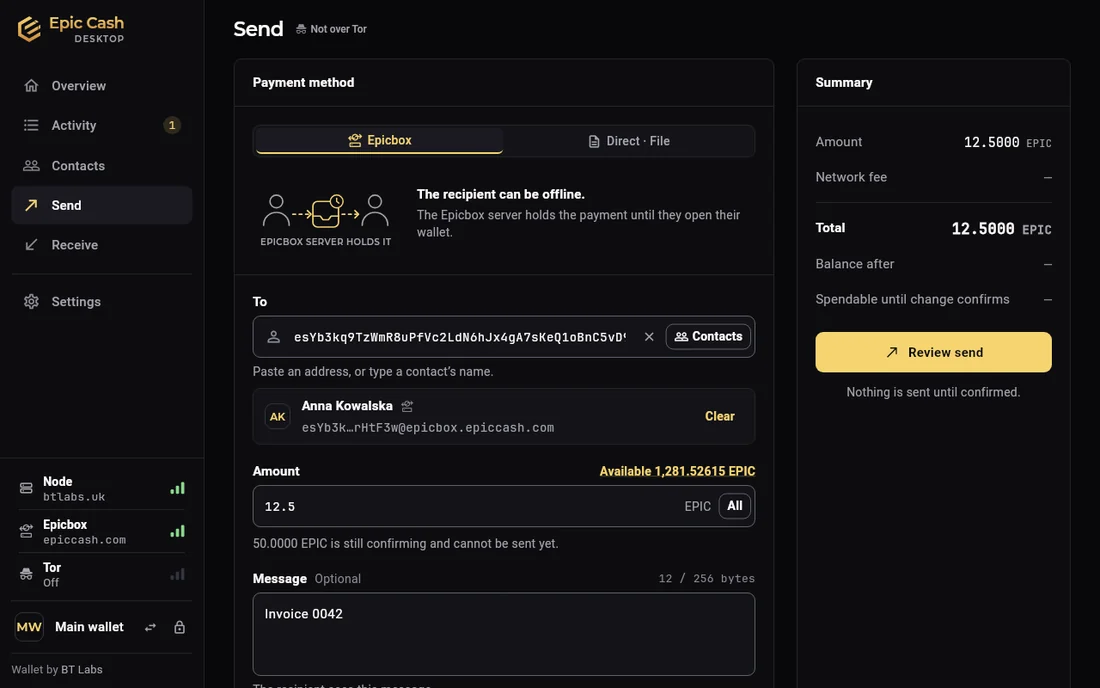
02Send

  • Paste an address, scan a QR code or pick a contact.
  • Fee and the balance after, shown before you confirm.
  • Optional message to the other wallet. Never on the blockchain.
  • Payment method first: Epicbox, Link (HTTP, Tor) or Direct (QR Payment, File Transfer). Epicbox by default; the other side can be offline.
  • Password on the desktop, PIN on the phone, then it goes.
Epic Cash Desktop, Send: the Check and send dialog with the amount 12.5000 EPIC, the recipient Anna Kowalska and her Epicbox address, the network fee, the total, which outputs are locked, the message, and a Password field above Send 12.5000 EPIC.
Desktop · Check and send
Epic Cash Mobile, Send, step 1 of 3: Epicbox, Direct and File tabs, the To field with Paste, Scan and Contacts, and recent recipients.
Phone · Send

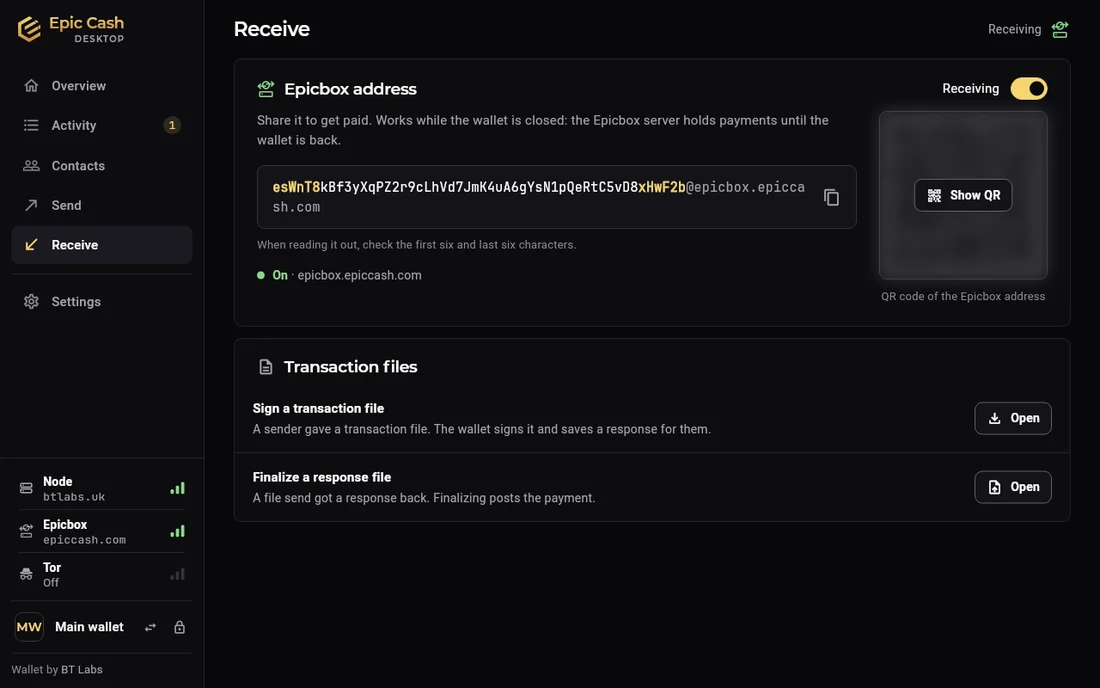
03Receive

  • One Epicbox address: copy it or show the QR code. Safe to share.
  • Works with the wallet closed. Epicbox holds the payment until you open it.
  • First and last six characters highlighted, for checking an address someone reads out.
  • Also: your own Tor address, HTTP on the desktop, transaction files.
  • Phone: Direct · QR scans a payment from the phone next to you. See QR Payment.
  • Request a payment (experimental, off by default): an invoice instead of waiting. On the phone also as a QR code the payer scans.
Epic Cash Desktop, Receive: the Epicbox address with its first and last six characters highlighted, Copy and Show QR, a Receiving switch that is on, and Other ways to receive: HTTP address, transaction files.
Desktop · Receive
Epic Cash Mobile, Receive: Epicbox, Direct and File tabs, the Epicbox address, a large QR code and How receiving works.
Phone · Receive

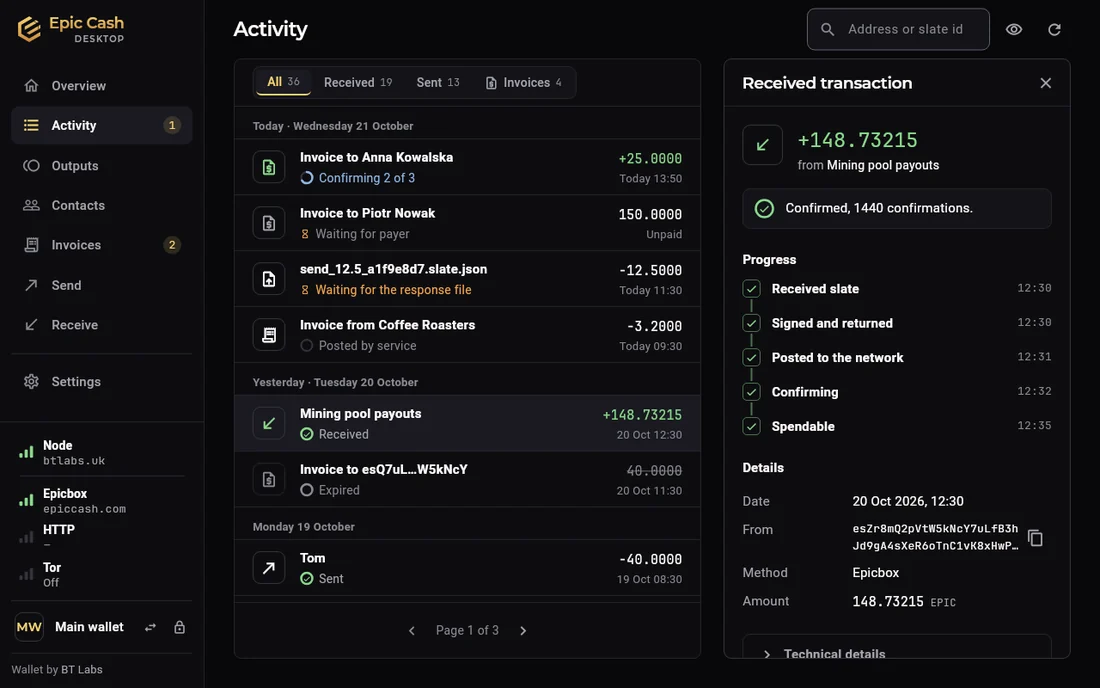
04Activity

  • Filters: Received, Sent, and Invoices when that is switched on. Search by name, address or transaction id.
  • State in words on every row: Confirming 2 of 3, Waiting for payer, Received, Cancelled.
  • Open a payment: received, signed and returned, posted, confirming, spendable.
  • Cancel a send the other side never answered. The coins unlock.
  • Restored and Found by scan labels after a restore or a recheck.
Epic Cash Desktop, Activity: the list with All, Received, Sent and Invoices filters, and beside it the details of a received payment of 148.73215 EPIC from Mining pool payouts: progress steps Received slate, Signed and returned, Posted to the network, Confirming, Spendable, and the details below.
Desktop · Activity
Epic Cash Mobile, History: search, the All, Sent, Received and Pending filters, and payments grouped by day with their state in words.
Phone · History

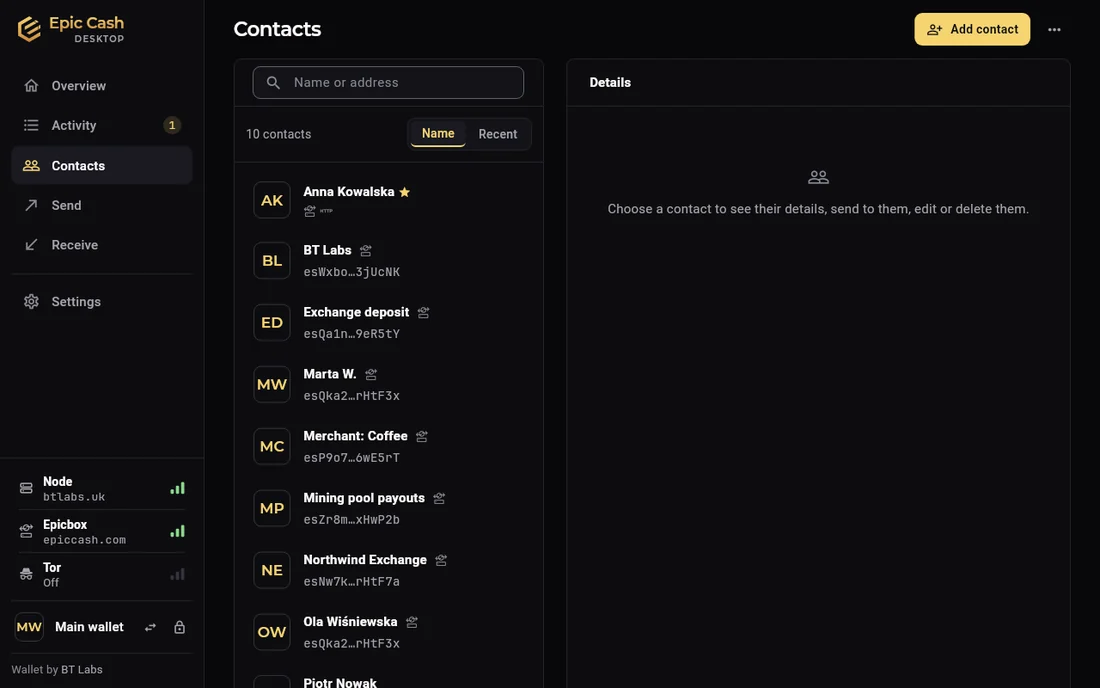
05Contacts

  • A name and an address: Epicbox, HTTP or Tor. The row says which.
  • Send from the contact, or pick one on Send.
  • Trusted for invoices (experimental, off by default): that contact can bill you. Nothing is paid without your approval.
  • Kept on this device. Included in a history backup.
Epic Cash Desktop, Contacts: a searchable list of contacts with an Epicbox or HTTP tag on each, and a details pane: choose a contact to see their details, send to them, edit or delete them.
Desktop · Contacts
Epic Cash Mobile, Contacts: Alice and Bob with their Epicbox addresses and a search field.
Phone · Contacts

06Invoices (experimental)

  • Off by default. Switch it on in Settings › Advanced › Experimental. The screens here have it switched on; the other screens do not.
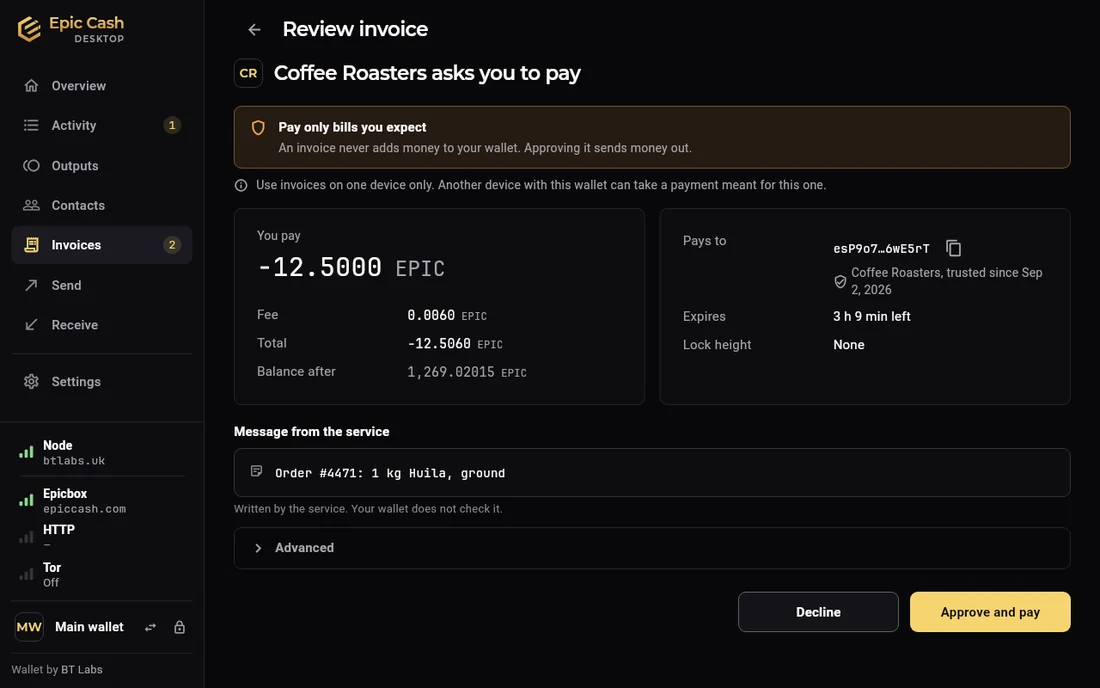
  • Pay: who asks, how much, the message, time left. Approve and pay asks for the password every time.
  • Only trusted senders reach the inbox. Everything else is dropped unread.
  • Issue: bill someone who trusts you. Issued, Paid, Confirming, Completed.
  • An invoice never adds money to your wallet. Nothing is paid without approval.
Epic Cash Desktop, Review invoice: Coffee Roasters asks you to pay 12.5 EPIC, with the fee, the total, the balance after, where it pays to, when it expires, the message from the service, and Decline and Approve and pay buttons.
Desktop · Review invoice
Epic Cash Mobile, Review invoice: Northwind Exchange asks for 42.5 EPIC, expires in 23 hours, the message, the sender's address, Pays from available to spend, Node and Epicbox state, and Approve and pay or Decline.
Phone · Review invoice

07Outputs

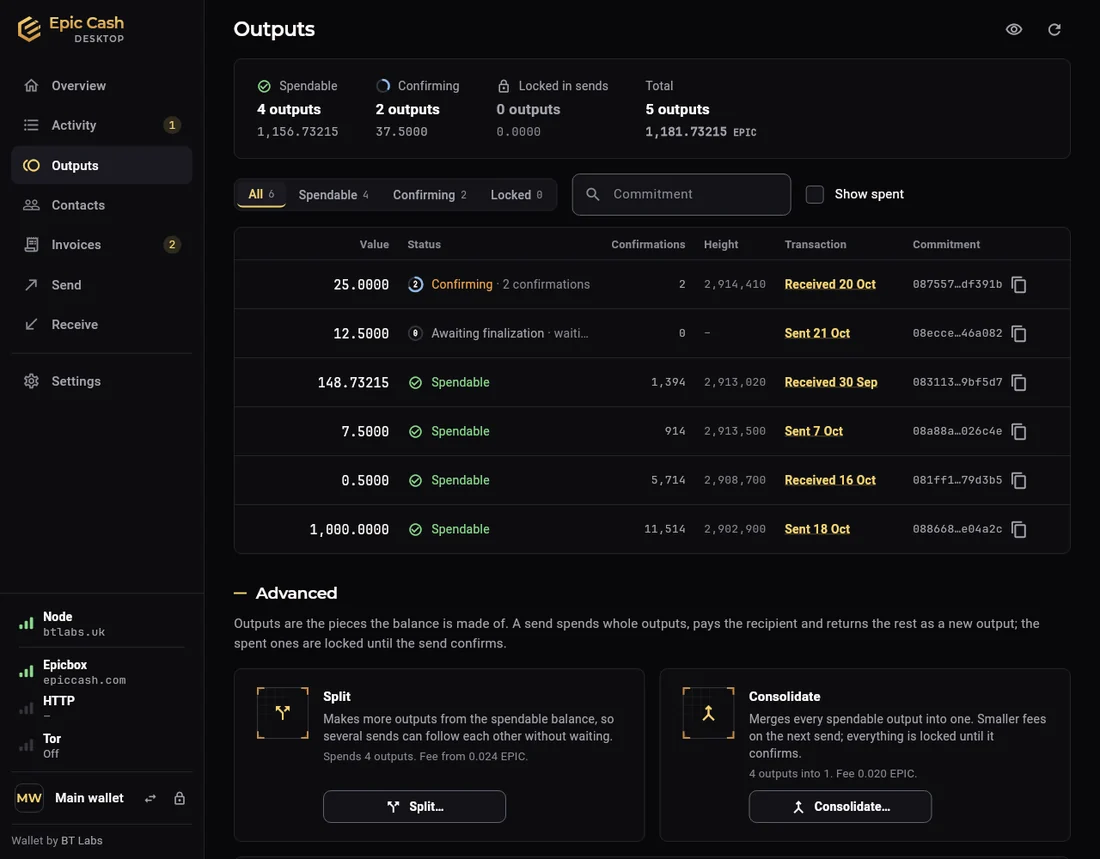
  • The balance as outputs, like notes in a wallet: Spendable, Confirming, Locked, Spent.
  • A send spends whole outputs. The change comes back and confirms: the locked part after a send.
  • Split for several sends in a row. Consolidate to merge.
  • Defaults for sends: Smallest first or All, and Split change.
Epic Cash Desktop, Outputs: Spendable, Confirming, Locked in sends and Total at the top, the table of outputs with value, status, confirmations, height, transaction and commitment, then Advanced with the Split and Consolidate cards.
Desktop · Outputs
Epic Cash Mobile, Outputs: tiles for Spendable, Confirming, Locked in sends and Total, the All, Spendable, Confirming and Locked filters, the list of outputs with a state each, then Advanced with Split and Consolidate.
Phone · Outputs

08Settings

  • Desktop, a page per topic: Node, Receiving, Privacy, Invoices, Appearance, This wallet, All wallets, Recovery phrase, Recheck balance, About, Help.
  • Phone, grouped: Security, Privacy & network, Wallet, Display, Help & feedback, About.
  • Appearance on the desktop: dark or light, interface scale 90 to 150 %.
  • Security on the phone: change the PIN, fingerprint or face unlock, auto-lock.
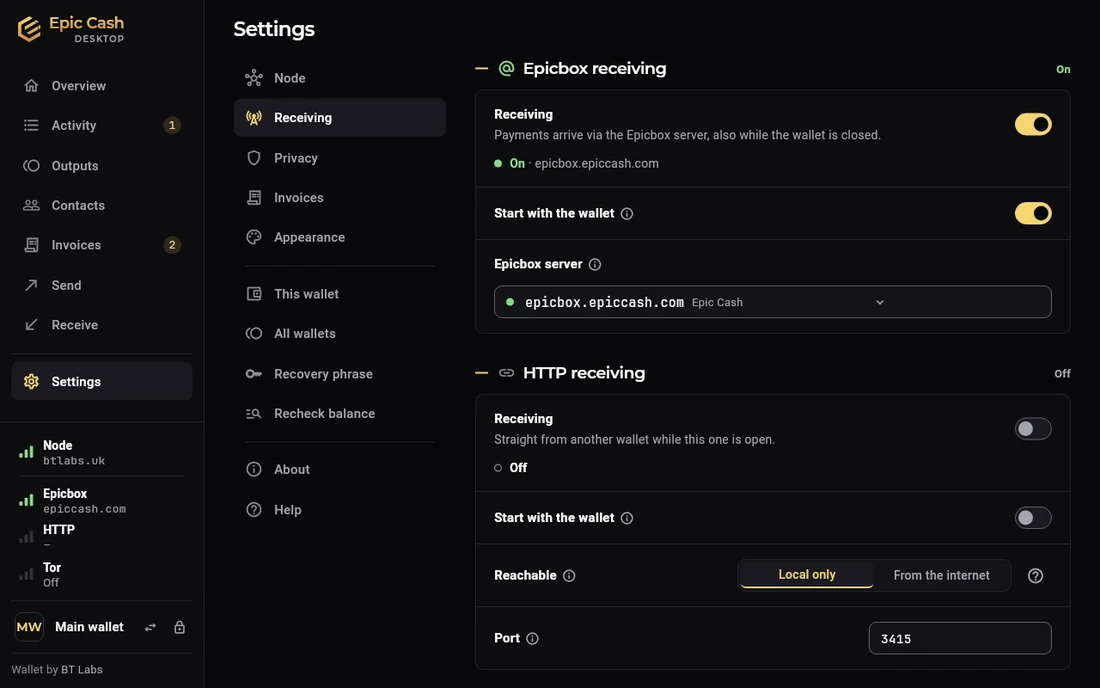
Epic Cash Desktop, Settings › Receiving: Epicbox receiving on, Start with the wallet, the Epicbox server field; HTTP receiving off, with Reachable Local only or From the internet, and the port.
Desktop · Settings › Receiving
Epic Cash Mobile, Settings: one row per group with a summary each: Security, Privacy & network, Wallet, Display, Help & feedback and About.
Phone · Settings

09Help

  • Sections: Getting started, How Epic Cash works, Keeping the wallet safe, Nodes and Epicbox, When something goes wrong, Invoices; on the desktop also Maintenance.
  • One-line answer first, then the detail. Search by any word.
  • Screens link to their topic: How receiving works, Why is it waiting?
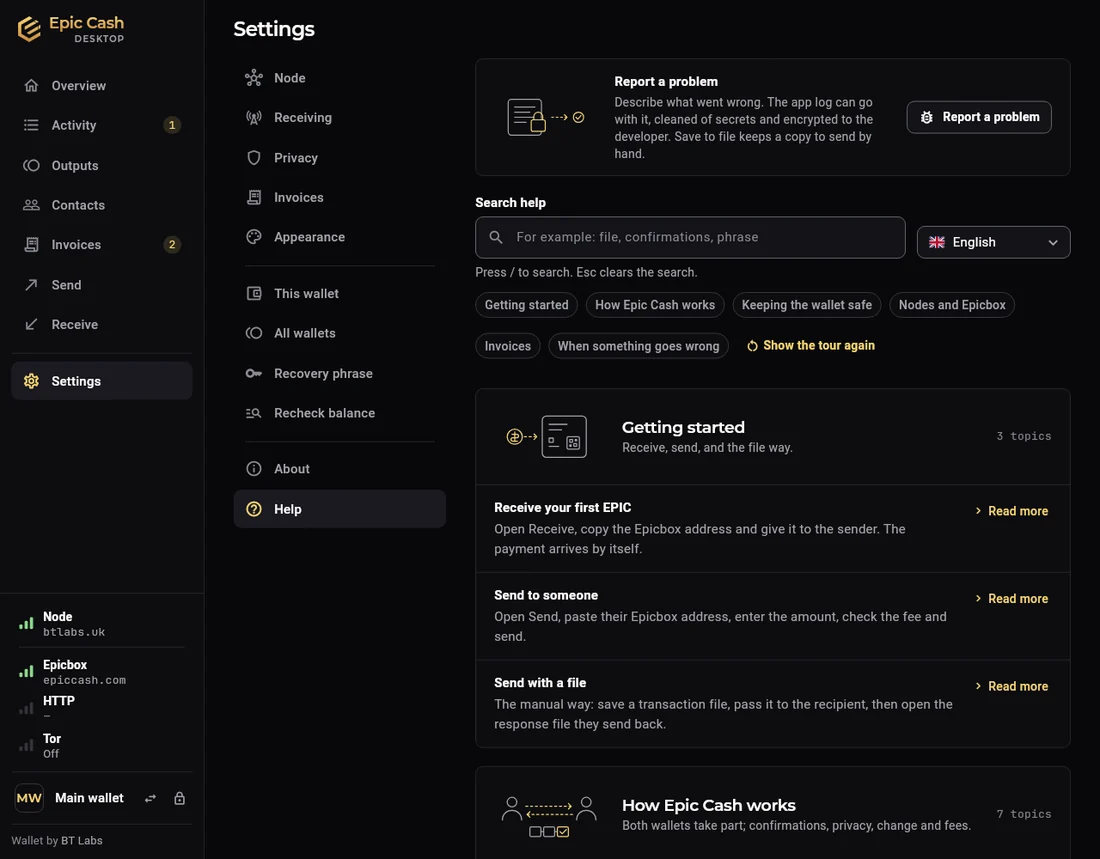
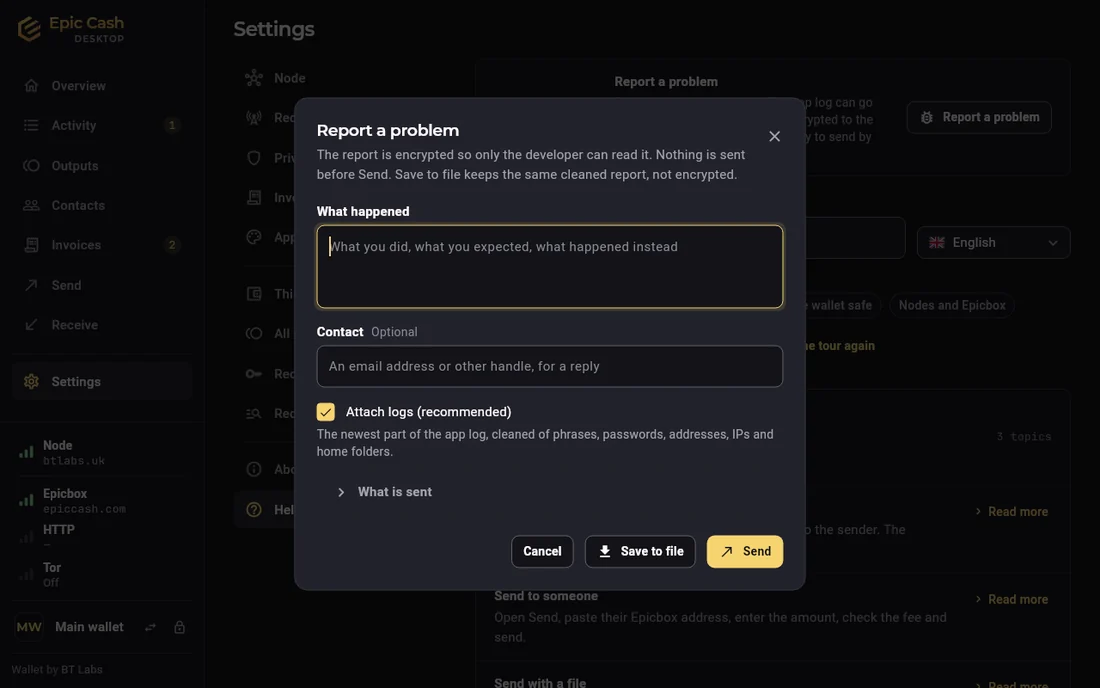
  • Report a problem: a description plus cleaned logs. What is sent shows exactly what leaves.
Epic Cash Desktop, Settings › Help: Report a problem at the top, a search field, topic chips, then the sections Getting started and How Epic Cash works with their topics and one-line answers.
Desktop · Help
Epic Cash Mobile, Send feedback: a message field, an email for a reply, Attach diagnostic logs with the secrets removed first, Preview what is sent, Send, and Share or save instead.
Phone · Send feedback

What's new for Epic

QR Payment: phone to phone

  • Pay someone standing next to you. No Epicbox, no pairing, no address to exchange: each phone only needs its node connection.
  • Send › Direct · QR Payment: the amount, then Make payment QR. The code stays hidden until you tap Show QR, counts down 3, 2, 1, and shows for 40 seconds at full brightness. Screenshots are blocked on that screen, and the code hides the moment you leave the app.
  • A larger payment is a moving code in several parts. The scanner counts the parts it has.
  • The other phone scans it under Receive › Direct · QR, accepts, and shows a reply code the same way. Scan the reply, and the payment is posted to the network.
  • Can be cancelled until you scan their reply.
  • Epic Cash Mobile only. The desktop keeps File Transfer and has no camera scanning.
  • Request an amount by QR (experimental, off by default; Settings › Advanced › Experimental › Invoices): the receiver shows the request as a code, the payer scans it, approves, and shows the reply; scanning that reply posts the payment. For a till or a stall.
Epic Cash Mobile, Payment QR: 12.5 EPIC to a phone next to you, the code showing with Part 1 of 1 and 38 seconds left, Hold the other phone's camera to this code, Screenshots are off on this screen, and Scan their reply.
Phone · The payment code, showing
Epic Cash Mobile, Direct · QR Payment, Scanned payment: Someone is sending you 12.5 EPIC, accept it, then show the reply to the sender; the message from the sender, and Accept payment.
Phone · The receiver's side after the scan
Epic Cash Mobile, Reply QR: to the sender of 12.5 EPIC, waiting for the sender to scan, the reply code showing with 38 seconds left, and Done.
Phone · The reply code for the sender to scan

Invoices (experimental, off by default)

  • Switch it on in Settings › Advanced › Experimental.
  • An invoice lands under Invoices › Pay. Read it, approve with the password, or decline.
  • A separate invoice address. Give it to services or replace it; the address you share for payments stays.
  • Trusted senders only: Settings › Invoices, or Trusted for invoices on a contact. Everyone else is dropped unopened.
  • Time to pay: up to 48 hours. After that it cannot be paid.
  • Issue your own: Invoices › Issue on the desktop, Request a payment on the phone. Issued, Paid, Posted, Completed; or bounced, when the other wallet takes no invoices.
  • Invoices travel over Epicbox, between Epic Cash Desktop and Epic Cash Mobile.
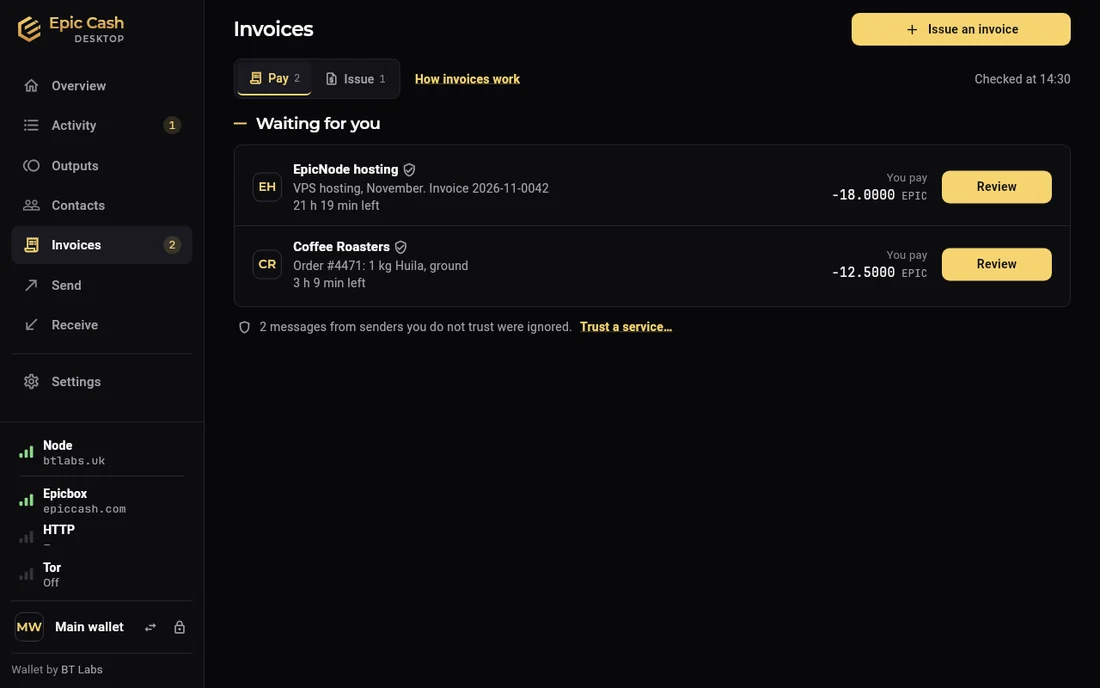
Epic Cash Desktop, Invoices › Pay: two invoices waiting, from EpicNode hosting for 10 EPIC and Coffee Roasters for 12.5 EPIC, each with a Review button and the time left; a line says two messages from senders you do not trust were ignored.
Desktop · Invoices › Pay
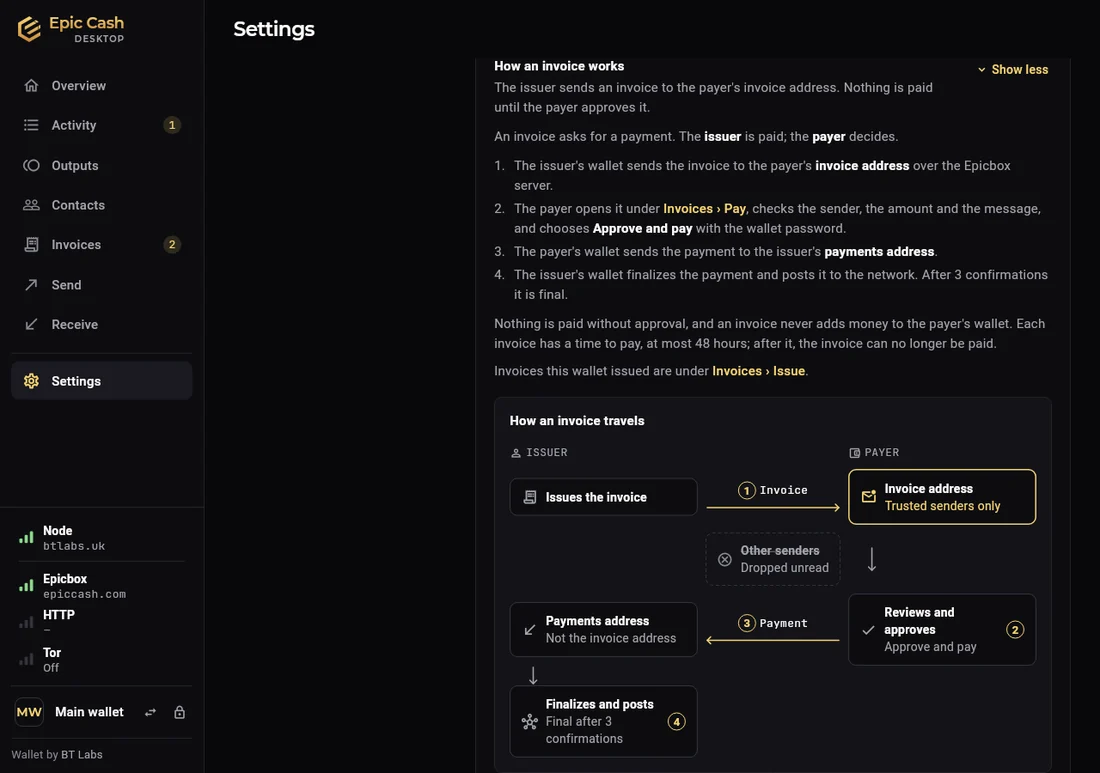
Epic Cash Desktop, Help: How an invoice works, the four steps and a diagram with an Issuer lane and a Payer lane: the issuer issues the invoice, it reaches the payer's invoice address, other senders are dropped, the payer reviews and approves, the payment goes to the issuer's payments address, the issuer finalizes and posts.
Desktop · Help: how an invoice travels
Epic Cash Mobile, Invoices: To pay and Sent tabs, one invoice from Northwind Exchange for 42.5 EPIC with 23 hours left.
Phone · Invoices
Epic Cash Mobile, Request a payment: before you request, they add your address to their trusted services and give you their invoice address; then the amount and a message to the payer.
Phone · Request a payment
Epic Cash Mobile, Settings › Invoices: your invoice address as a QR code with Copy, and the trusted services list with Add a service.
Phone · Invoice address and trusted services

Switch the node or the Epicbox server live

  • Tap Node or Epicbox on the phone's Home, or open the field in the desktop's Settings.
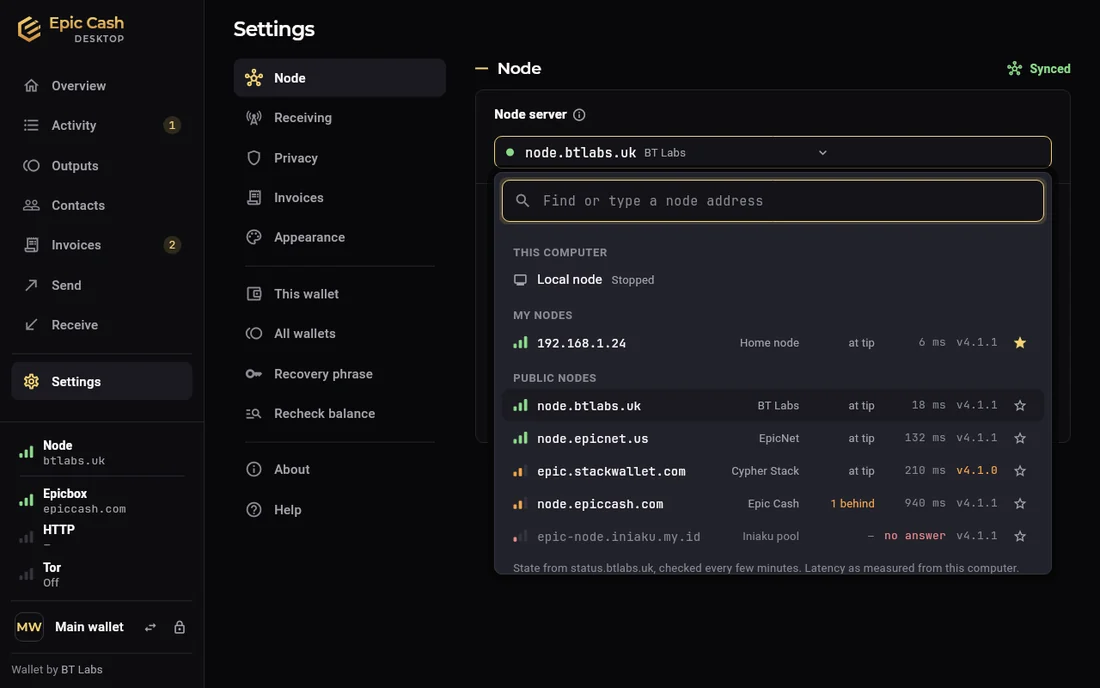
  • Public servers listed with state, height, latency and version. Star one to keep it in your own list.
  • Switches live: no restart, the wallet stays unlocked.
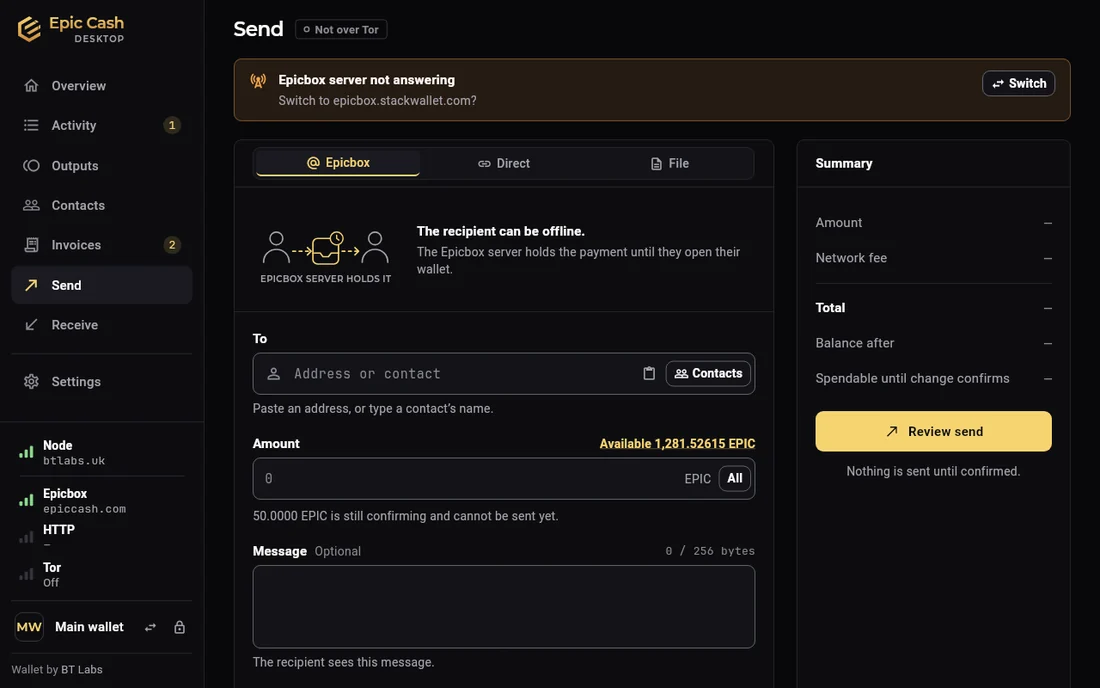
  • Node behind, Epicbox not answering, or Epicbox blocked by the network you are on: the wallet says so and offers another server in one click. A node that stops answering is replaced for the session by the next working one, and the wallet says so.
  • A new Epicbox server changes the part after @ in your address. The wallet reminds you to share the new one.
Epic Cash Desktop, Settings › Node, the node field open: Local node on this computer, My nodes, and the public nodes with operator, height, latency and version.
Desktop · The node field, open
Epic Cash Desktop, Send, with a notice at the top: Epicbox server not answering, switch to epicbox.stackwallet.com?, and a Switch button.
Desktop · Epicbox not answering, another server one click away

Help written for someone new to Epic Cash

  • What an address looks like, why a payment needs both sides, what Confirming means, what a restore brings back.
  • Same words on the desktop and the phone, with each device's own names and places.
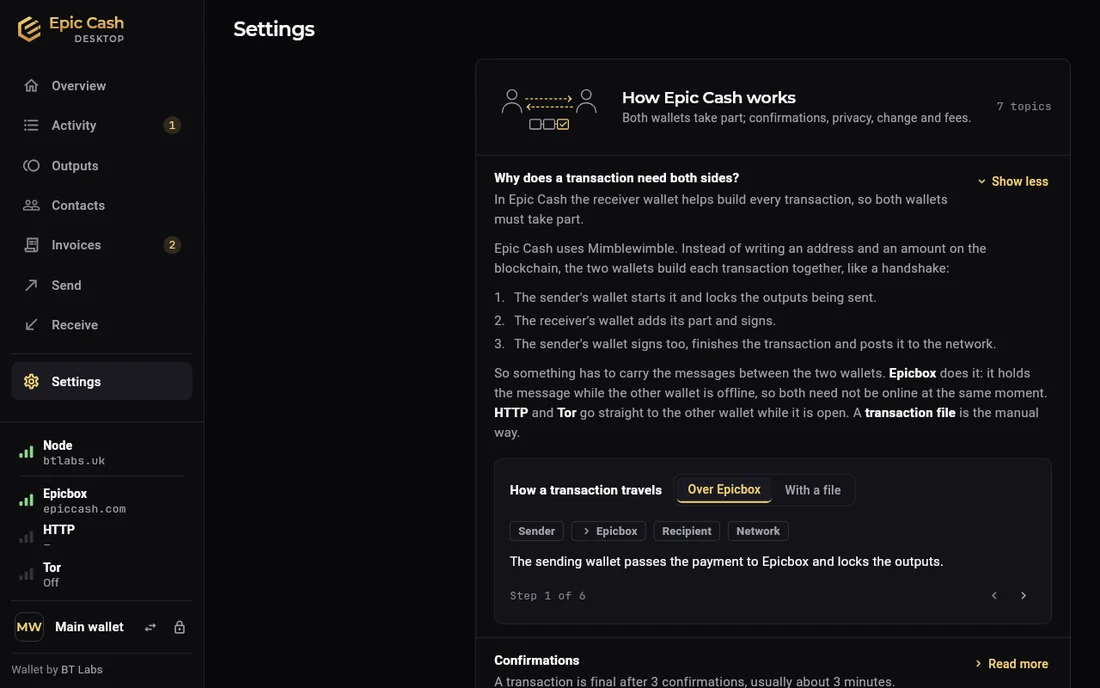
  • The handshake topic has a stepper that walks a payment through both wallets. The invoice topic has a diagram.
Epic Cash Desktop, Help, the topic Why does a transaction need both sides?, with the three steps of the handshake and a stepper that shows how a transaction travels over Epicbox or with a file.
Desktop · The handshake stepper
Epic Cash Desktop, Report a problem: What happened, an optional contact, Attach logs with the newest part of the app log cleaned of phrases, passwords, addresses, IPs and home folders, What is sent, and Cancel, Save to file and Send.
Desktop · Report a problem

Outputs, explained in the app

  • The Outputs page says what an output is, why part of the balance locks after a send, and what Split and Consolidate do.
  • The tiles on Home open Outputs filtered to that state. Locked in sends shows which coins and why.

Two names, one mark

  • Epic Cash Desktop on Windows and Linux. Epic Cash Mobile on Android. Same core, same addresses, same help.
  • One gold mark on black: app drawer, Start menu, window and installer.

Epicbox, Link and Direct

A payment is a handshake: both wallets take part. The message between them travels one of three ways, each with its own switch in Settings › Transactions.

Epicbox

Everyday. The default.

  • The server holds the message until the other wallet comes online. Nobody has to be online at the same time.
  • Messages encrypted. The server cannot spend anything.
  • Address ends in @ and the server's name.

Link

Both wallets open. No server in between.

  • Straight to the other wallet: Link · HTTP to http://host:3415, or Link · Tor to an .onion address.
  • The other wallet must be open and reachable right now.
  • HTTP receiving on the desktop is off until you turn it on. Tor needs no setup.

Direct

No connection between the wallets.

  • QR Payment, phone to phone: the sender shows a moving QR code, the receiver scans it and shows a reply code to scan back. Each phone needs only its node.
  • File Transfer: save a .tx file and pass it on: chat, email, USB stick. The other wallet signs it and sends a response file back. Open that, and the payment is posted.
  • Works with other Epic Cash wallets, whatever they call the steps.
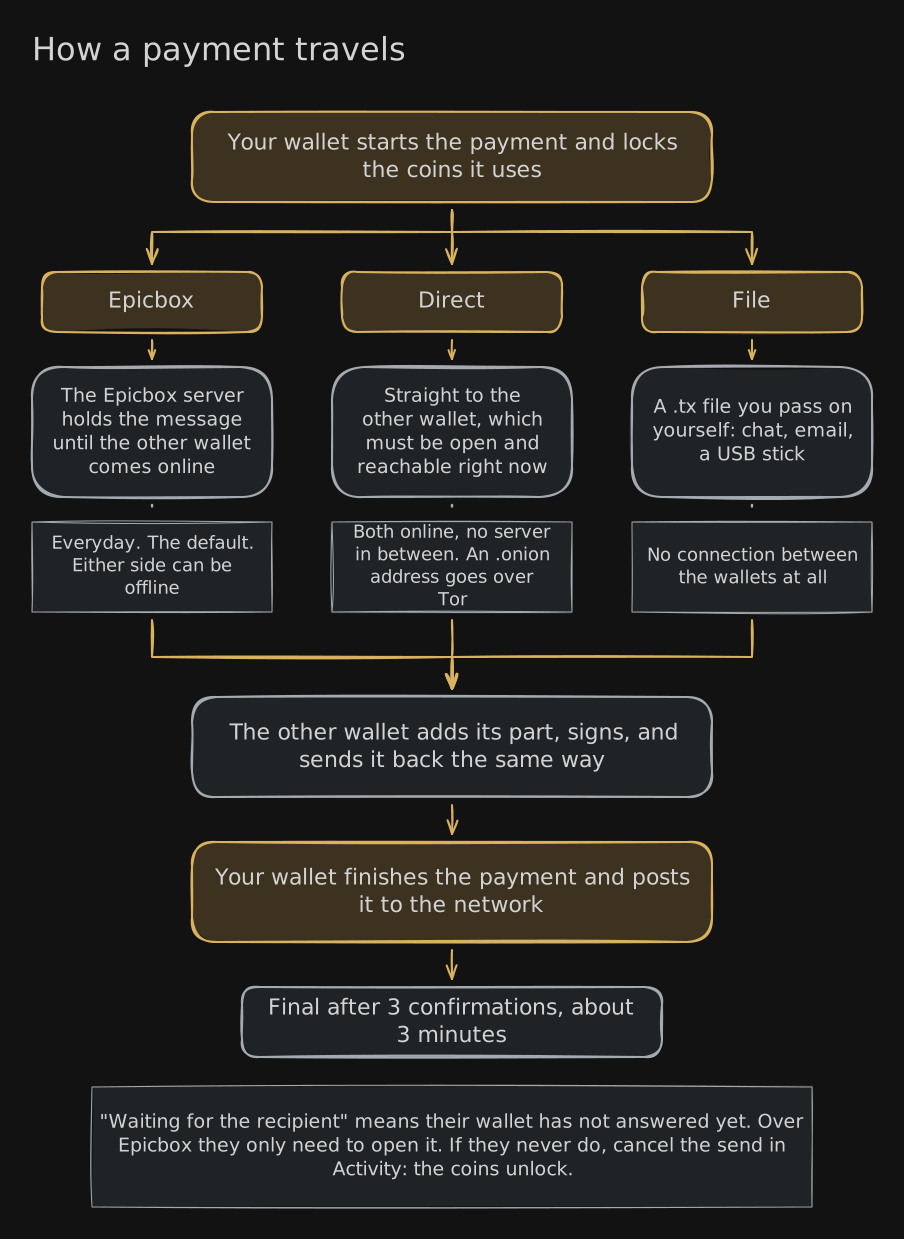
How a payment travels. Your wallet starts the payment and locks the coins it uses. The message goes one of three ways: Epicbox, where the server holds it until the other wallet comes online (everyday, the default, either side can be offline); Direct, straight to the other wallet, which must be open and reachable right now (both online, no server in between, an .onion address goes over Tor); or File, a .tx file you pass on yourself by chat, email or a USB stick (no connection between the wallets at all). The other wallet adds its part, signs, and sends it back the same way. Your wallet finishes the payment and posts it to the network. Final after 3 confirmations, about 3 minutes. Waiting for the recipient means their wallet has not answered yet; over Epicbox they only need to open it; if they never do, cancel the send in Activity and the coins unlock.
How a payment travels. Tap to enlarge.

“Waiting for the recipient”

  • Your wallet started the payment and locked the coins. Their wallet has not answered yet.
  • Epicbox: they only need to open their wallet within 24 hours.
  • Link: their wallet was not reachable. Try again, or send the same payment as a file.
  • No answer within 24 hours: the wallet cancels the send and the coins unlock. Cancel in Activity unlocks them sooner.
  • Answered: your wallet posts the payment to the network. Final after 3 confirmations, about 3 minutes.
Epic Cash Mobile, a payment to Alice of 25 EPIC: Waiting for recipient, the steps Payment started, Waiting for recipient, Sent to the network, Confirming, Completed, and Cancel payment.
Phone · Waiting for recipient
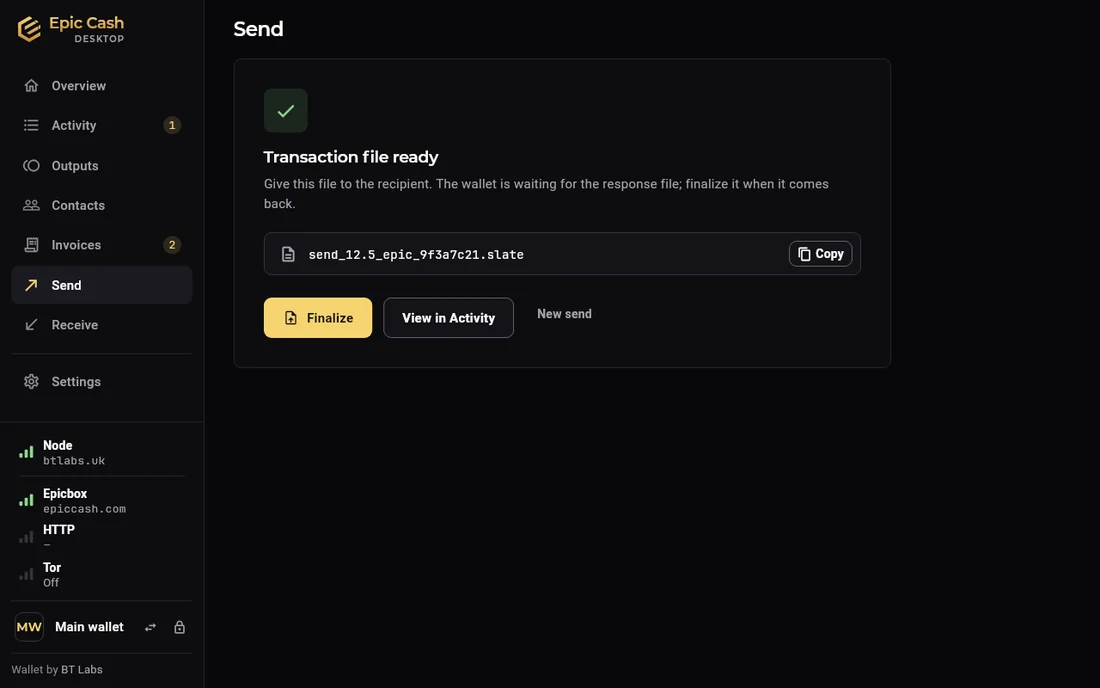
Epic Cash Desktop, Send: Transaction file ready. Give this file to the recipient; the wallet is waiting for the response file. Finalize, View in Activity, New send.
Desktop · A payment by file, waiting for the response file
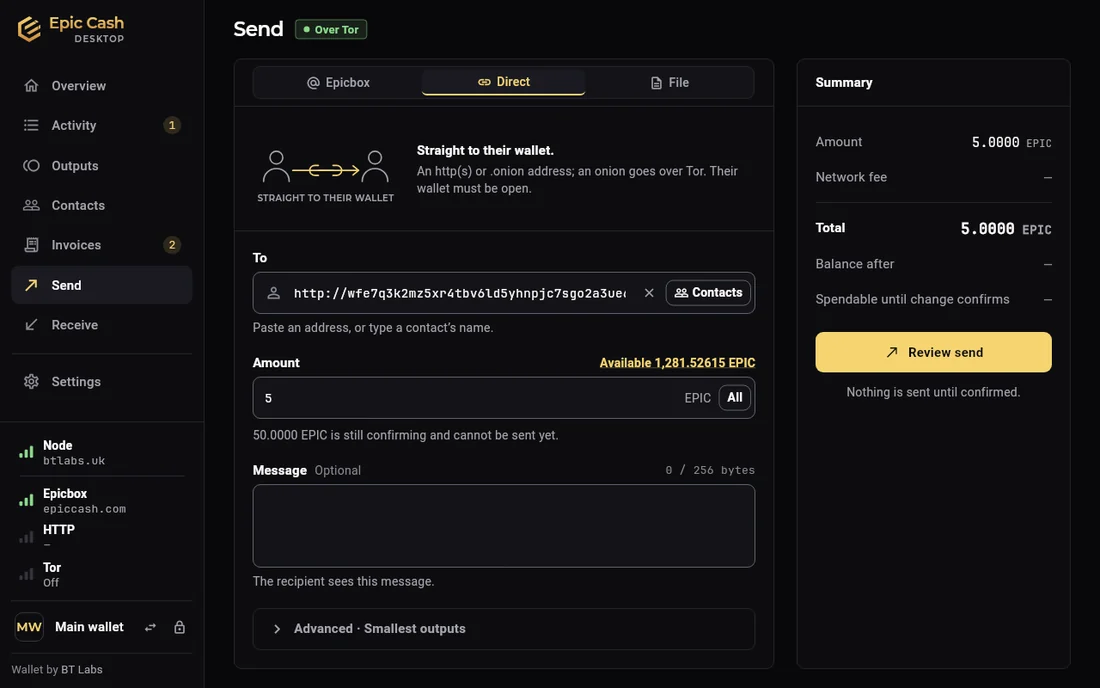
Epic Cash Desktop, Send on the Direct tab, Over Tor: Straight to their wallet, an http(s) or .onion address, the To field holding an .onion address, Amount 5 EPIC, and the Summary with the network fee, total and balance after.
Desktop · Send, Direct: straight to an .onion address over Tor

Tor: one switch

Settings › Privacy on the desktop. Settings › Privacy › Tor Network on the phone. Off by default.

On

  • Hides your internet address from everything the wallet talks to: node, Epicbox, status site, price, update check, problem reports.
  • Nothing goes around it. While Tor starts, the wallet waits. If Tor cannot connect: Not connected, with Retry or Off. No quiet fallback.
  • The wallet gets a Tor address of its own, ending in .onion. Other wallets can pay straight to it, with nothing to open on the router.
  • Tor runs inside the app. Nothing to install.

Unchanged

  • The Epicbox address you share. The same node, the same server.
  • A node on this computer stays direct.

Good to know

  • Slower than without Tor.
  • Blocked in some countries. There it does not connect.
  • The Tor row in the desktop sidebar shows its state.
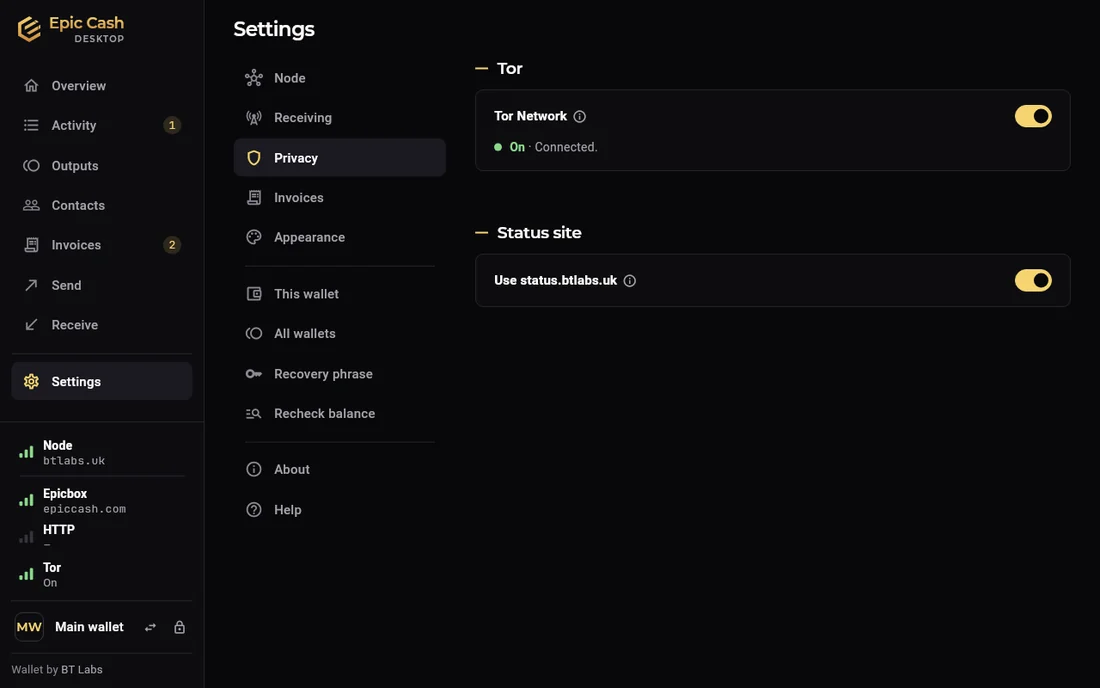
Epic Cash Desktop, Settings › Privacy: Tor Network on, Connected; Status site: use status.btlabs.uk, on. The sidebar's Tor row reads On.
Desktop · Settings › Privacy, Tor on
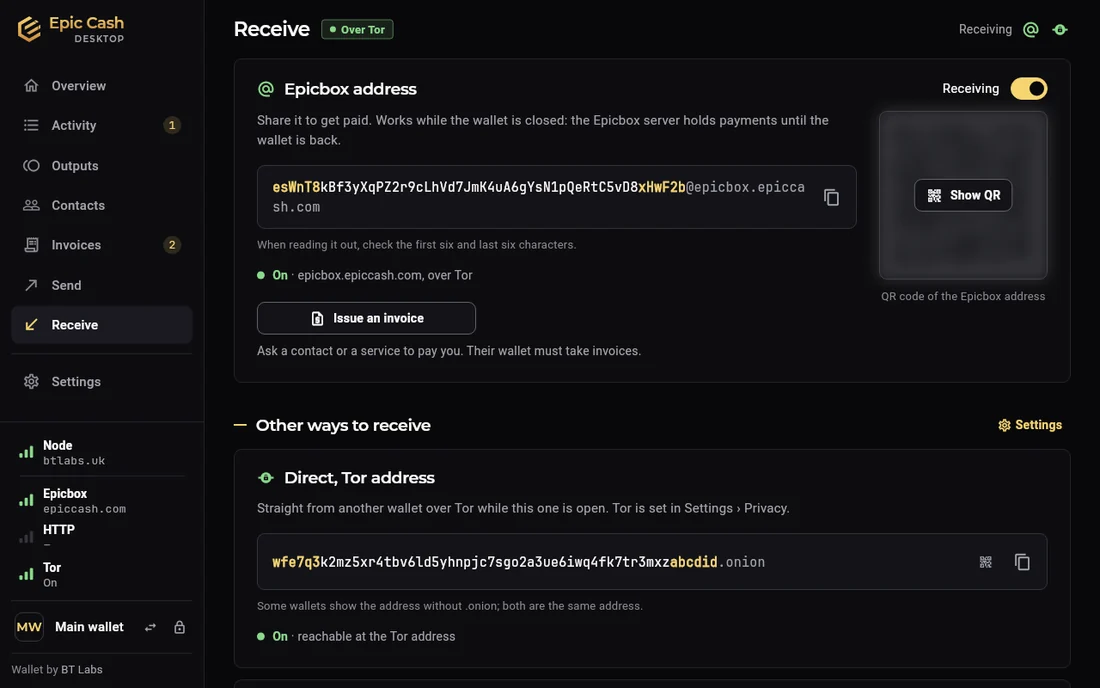
Epic Cash Desktop, Receive with Tor on: the Epicbox address over Tor, and under Other ways to receive the wallet's Direct Tor address ending in .onion, reachable at the Tor address.
Desktop · Receive with Tor on: the wallet's own .onion address
Epic Cash Mobile, Settings › Privacy & network: the Node and Epicbox rows, the Tor Network switch with an info icon, Use status.btlabs.uk, and the servers.
Phone · The switch under Privacy
Epic Cash Mobile, Receive › Direct with Tor on: Straight to this wallet, works while the app is open; the Tor address ending in .onion, Tor On, and its QR code.
Phone · Receive at the Tor address
Epic Cash Mobile, Send › Direct to an .onion address: Needs Tor with Turn on Tor, and the new recipient marked Over Tor.
Phone · Send to an .onion address

The LEPIC core

Both apps run on LEPIC, an Epic Cash wallet core written in Rust for phones first.

Built for the app

  • A library, not a program. The standard Epic Cash wallet runs as its own server; a phone cannot keep one alive in the background. LEPIC lives inside the app: nothing to start, nothing to keep running.
  • Small. No mining code, no chain storage. About 7 MB on Android.
  • Made for being paused. When the phone suspends the app, the Epicbox client connects, collects what is waiting, and disconnects.
  • Keys in secure storage. The seed lives in the Android Keystore; on the desktop in a vault file encrypted under the wallet password. Transaction secrets encrypted at rest; only a short, fixed list of secrets can ever reach the app layer.

Compatible with Epic Cash

  • Tracks the latest official Epic Cash release, pinned to exact commits. Same cryptography library, pinned too.
  • Byte-for-byte test data: slates, keys, signatures and Epicbox messages generated by the real Epic Cash code, which LEPIC's tests reproduce exactly.
  • An interop suite runs LEPIC against an unmodified epic-wallet, node and Epicbox relay on a private test network.
  • A weekly job reports changes in the Epic Cash code that LEPIC has not reviewed yet.

Checked

  • Parsers of everything untrusted are fuzzed: slates, Epicbox messages, node answers, vault files.
  • Bad input from the network, a file or another wallet becomes an error, never a crash. Code that can panic fails the lint.
  • Two independent security reviews, each by a reviewer who wrote none of the code, findings fixed before this release.
  • Dependencies checked for known vulnerabilities, licences and sources on every change. Apache-2.0 licence.

Desktop and phone

Epic Cash DesktopEpic Cash Desktop

  • Windows 10 and 11, Linux; macOS as a preview. Password wallets, as many as you like, each in its own folder.
  • Its own title bar: the app menu (Lock wallet, Keyboard shortcuts, Copy build info, Quit), the wallets on this computer, and what is happening now, such as a send or a scan.
  • Forgot password? on Unlock: a new password from the recovery phrase. The history stays.
  • A first-run tour: seven steps, one page each, over the real pages.
  • Built-in node: pick Local node and the desktop runs an Epic node itself. Downloads the blockchain once, then reads it from your own computer. A public node fills in while it syncs. Off by default.
  • HTTP receiving for other wallets on your network, or from the internet if you set up the router.
  • Import from older Epic Cash wallets: looks in ~/.epic; Choose a folder… for any other folder.
  • Interface scale 90 to 150 %.

Epic Cash MobileEpic Cash Mobile

  • Android 7 or newer, arm64 phones; iPhone as a preview, without Tor.
  • First screen: Create a wallet or Restore from a phrase.
  • 6-digit PIN. Fingerprint or face to unlock. Auto-lock after a few minutes.
  • Receives while the app is open. Collects what waited at Epicbox at the next unlock.
  • Node and Epicbox switch live from Home.
  • QR Payment to the phone next to you.
  • English, German, Polish, Russian and Chinese.
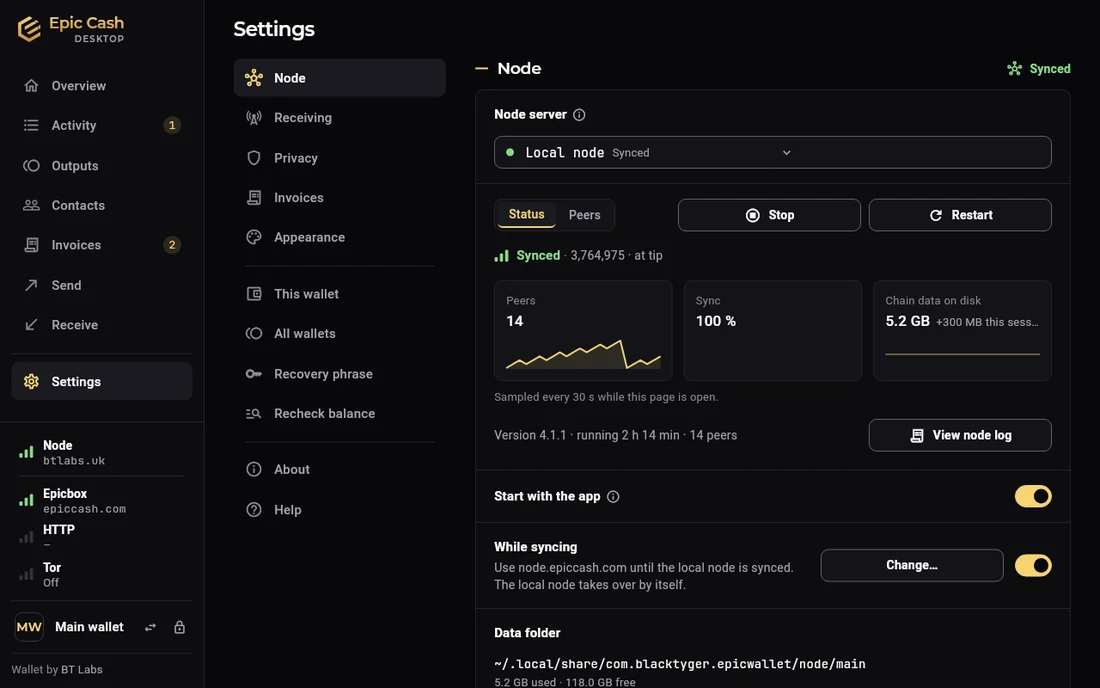
Epic Cash Desktop, Settings › Node with the Local node chosen and synced: peers, sync 100 %, chain data on disk 5.2 GB, running 2 h 1 min with 14 peers, Stop and Restart, Start with the app, While syncing use node.epiccash.com, and the data folder.
Desktop · The built-in node, synced
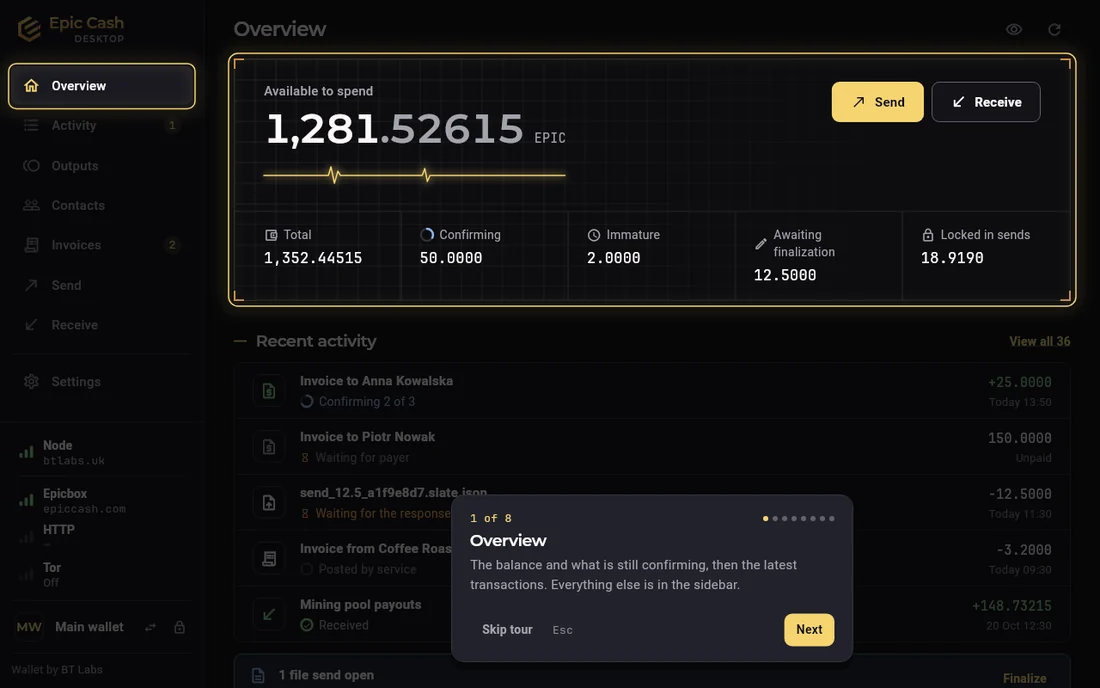
Epic Cash Desktop, the first-run tour on Overview: step 1 of 7, the balance area lit, a card that says the balance and what is still confirming, and Skip tour, Back and Next.
Desktop · The first-run tour
Epic Cash Mobile, first run: Welcome, choose a 6-digit PIN, and I already have a wallet: restore it.
Phone · First run
Epic Cash Mobile, Unlock wallet: the mark, the PIN field and Forgot PIN?
Phone · Unlock
Epic Cash Mobile, Recovery phrase: write these 24 words on paper, in order, and keep them private; the words in a numbered grid.
Phone · The recovery phrase, after the PIN

Also in the app

  • Versions follow the calendar. 26.10.0 is October 2026. A fix is 26.10.1.
  • Recovery phrase shown only after the password or PIN, never sent anywhere. Copy clears the clipboard after 60 seconds, or when the wallet locks.
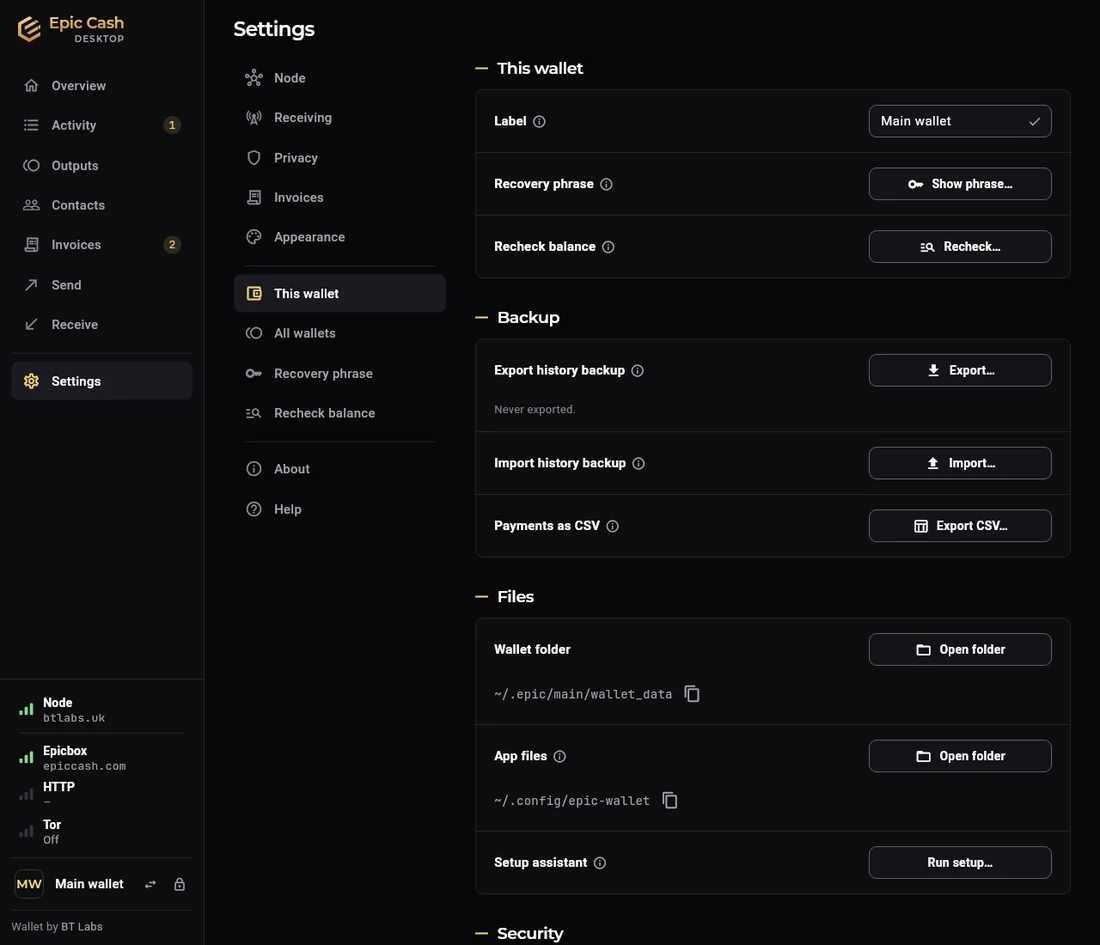
  • History backup. Who paid what, messages, labels, contacts and invoices are not on the blockchain, so a restore cannot bring them back. Export history backup keeps them in a file, with the wallet name and settings; never the recovery phrase. Import is one step. Payments also export as CSV.
  • Restore from the phrase, from the first block or a start height. A restore that has not finished says so and completes by itself.
  • Nodes on your home network or Tailscale work over plain http.
  • Before the first import from older software, a one-time warning: have a backup of every wallet first, recovery phrase included.
  • Recheck balance reads the whole blockchain again for this wallet's outputs.
  • Hidden balances with the eye. Prices in a currency of your choice, or none.
  • Transaction files go to Downloads on the desktop as <id>.tx. The signed answer is saved beside them.
  • Cancelling a paid invoice that never posted gives the locked coins back.
Epic Cash Desktop, Settings › This wallet: the label, Show phrase, Recheck balance; Backup with Export history backup, Import history backup and Payments as CSV; Files with the wallet folder and app files.
Desktop · This wallet, with the backups